Our boss recently asked the team one of those seemingly innocent questions that makes the inquisitive part of your brain itch, “Can Alchemist AI Pro™ Use Cases build out a ServiceNow® application?”. Since I have been working on Applied Alchemy integration with other application platforms, the “how would I accomplish that” came to mind.
A little bit of product research on ServiceNow® capabilities led me to NowAssist, the ServiceNow® native generative AI layer built into the Now Platform for task automation, information summarization, and engaging with enterprise workflows. The specific ability of use is its “text-to-code” power; with some formatting of Alchemist’s use case output, we can have the NowAssist Generative AI Capability create a runnable application. NowAssist paired with the Otto Work Assistant can build and help resolve our requests and workflows.
The effort involved in taking Alchemist AI Pro™ content (use cases) to ServiceNow® is in mapping the content format of the Alchemist AI Pro™ report file to the structure of Snow application definitions. The prototype code included in this technote provides two language specific pathways to accomplish this end.
Why ACC3 International and Alchemist AI Pro™?
-
Alchemist AI Pro™ can consume content from multiple application definition/requirements/use case formats. Leveraging this capability lets ServiceNow® replatform applications from any of the content types Alchemist AI Pro™ can read.
-
Using Alchemist AI Pro™ with the transfer tools does not require any significant changes to the ServiceNow® implementation. Alchemist AI Pro™ handles the translation, story coherence, and the complexity.
-
The transfer tooling handles the iteration of the story content and feed to the ServiceNow® instance
-
All the capabilities of having Alchemist AI Pro™ upstream still hold, including verification of the outcomes, assurance of consistency, and confirmation that requirements are correct, complete, and clearly defined.
-
Alchemist AI Pro™ analyzes its outcomes using an adversarial AI approach to ensure the solution is solving the right problem the right way.
Details
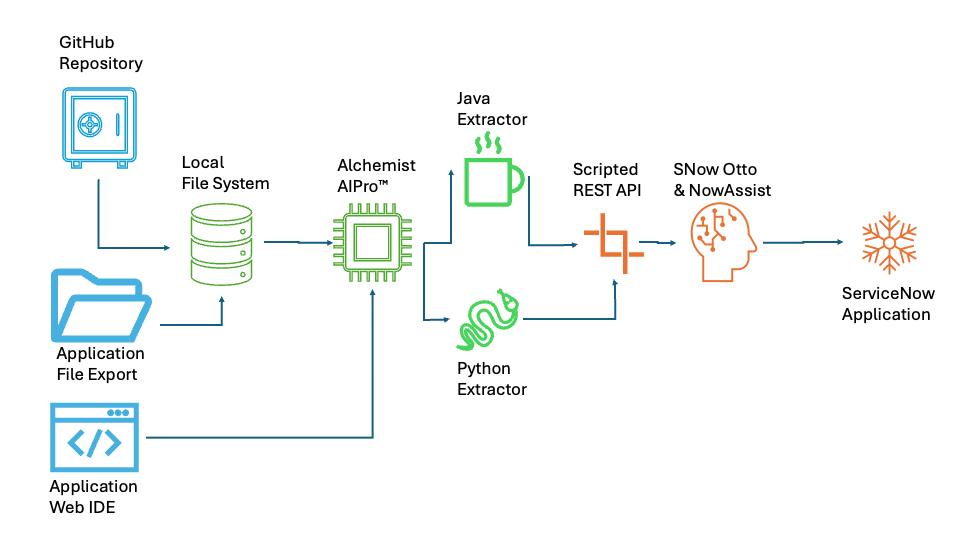
This solution implements capability to integrate Alchemist AI Pro™ generated Use Cases into an application in running on a ServiceNow® platform. Content is read from the Alchemist AI Pro™ report file, parsed, structured for NowAssist, and then POSTed to the ServiceNow® endpoint to be processed and rendered into a ServiceNow® application.
The application is implemented twice: once in Python and again in Java. Both are set up to use a properties file for configuration (a sample is provided). The formatted JSON is sent to a ServiceNow® Scripted REST API which ingests the data and triggers NowAssist to turn the use case information into the needed application.
To migrate an application Alchemist AI Pro™ is run as normally, the output report file is used as input to one of the Extractor applications which leverage the custom REST API to update ServiceNow® via Otto and Now Assist, and the result is a ServiceNow® application.
Below are the key features of the Python and Java applications. Both programs support:
-
Command-Line Arguments: Pass one or multiple file paths directly (python script.py file1.pdf file2.docx).
-
GUI File Selection Dialog: If no command-line arguments are supplied, a native file chooser dialog opens automatically allowing multi-file selection.
-
Structured Logging: Log outputs are written to both the console and a file (processing.log).
-
Graceful Error & Exception Handling: Processing failures on individual files are logged, recorded, and skipped without crashing the remaining queue.
-
Load Configuration from snow. properties: Look for an external properties file in the execution directory. If found, properties defined in the file take precedence; missing or blank properties fall back to hardcoded defaults.
-
Tracking File & Text Statistics: Calculate and report metrics including extracted line counts, character counts, word counts, and execution duration per file and for the entire batch.
-
Enhanced Console & Log Output: Display structured progress indicators and a summary table/breakdown upon batch completion.
Python Implementation
This implementation uses standard tkinter for the GUI dialog, logging for console/file outputs, and requests for ServiceNow® interaction.
Key to this solution is the Python parser using regular expressions to extract structured sections into dictionaries/data classes and structure payloads targeting ServiceNow® REST/Table APIs or virtual agent endpoints.
Java Application Implementation
This implementation utilizes Java Swing (JFileChooser) for UI dialogs, java.util.logging for logging, Apache Tika for document parsing, and the native Java 11+ HttpClient.
Sample snow.properties File
Both the Python and Java implementations utilize the common format snow.properties file for configuration and place the file in the same directory where you run the script/application.
Alchemist AI Pro™ Integration
Both solutions handle parsing content structured in the Alchemist output like SummaryAndUseCases.txt, which is a file composed of Executive Summaries, high-level features, numbered sections (indicated by ###), and Use Cases with explicit Acceptance Criteria and Specifications. The two programs extract key operational properties (such as task titles, priority, skills, work types, and requirements) and construct payload representations consumable by ServiceNow’s® Now Assist (LLM/Generative AI framework) and/or Otto (Virtual Agent / Bot integration).
Key Capabilities
-
File Format Parsing: Handles multi-line strings, delimited text (###), and structured fields (Use Case:, Acceptance Criteria:, Specification:, Why:, What:).
-
Now Assist Data Model: Packages extracted use cases into unstructured context blocks or JSON structures optimized for Now Assist prompts, skill execution, or generative summarization.
-
Otto Integration: Prepares structured entities (e.g., WorkType, TaskPriority, RequiredSkills) to drive conversational flows, virtual agent intents, and automated ticket creation in ServiceNow® tables (e.g., sn_customerservice_case, incident, or custom tables).
Java Implementation
Below is the Java parsing utility utilizing basic RegEx/string processing to parse the file into strongly typed objects and construct payloads for ServiceNow® APIs (Table API or Now Assist REST endpoints).
1. Configuration File: snow.properties
Properties
# ServiceNow Connection Settings
snow.instance=https://your-instance.service-now.com #Example
snow.username=admin #Example
snow.password=SecretPassword123! #Example

# Application Execution Settings
snow.log_file=snow_ingestion.log
snow.api_endpoint=/api/x_custom_app/now_assist_otto_ingest
2. Payload Samples
Payload: JSON Request Payload
{
  "title": "Loan Application Feature",
  "document_text": "As a loan applicant, I want to upload proof of income PDFs so that the system can auto-fill my income verification..."
}
Successful JSON HTTP Response
{
  "status": "success",
  "title": "Loan Application Feature",
  "ai_output": {
    "summary": "User story requesting document parsing for income validation.",
    "suggested_tables": ["u_loan_application", "sys_attachment"],
    "acceptance_criteria": [
      "User can upload PDF formats.",
      "System extracts income numerical fields within 5 seconds."
    ]
  }
}
Service Ingestion Payload JSON Schema
{
  "short_description": "Validate Trigger Integrity",
  "description": "Validate that all incoming trigger data conforms to predefined classification schemas.",
  "now_assist_context": {
    "task_purpose": "Validate Trigger Integrity",
    "business_justification": "In complex automated systems, triggers are the critical spark...",
    "functional_scope": "The Validate Trigger Integrity feature provides a comprehensive pre-deployment check...",
    "acceptance_criteria": [
      "Given a trigger is received via API, when the system performs validation, then the system should verify that the classification code exists in the master database.",
      "Given an invalid classification code is provided, when the system validates the input, then the trigger should be marked as 'Pending Review' instead of being registered."
    ]
  },
  "otto_intent_mapping": {
    "intent": "Trigger_Operational_Workflow",
    "utterance": "Validate Trigger Integrity"
  }
}
Payload: JSON Request to ServiceNow® Scripted REST API
{
  "source": "CentralizeTrial",
  "generated_date": "1/30/2026",
  "document_title": "Integrated Operational Dispatch and Workflow Platform",
  "sections": [
    {
      "section_type": "Executive Summary",
      "content": "The Integrated Operational Dispatch and Workflow Platform is a comprehensive digital solution designed to transform organizational productivity..."
    },
    {
      "section_type": "Initiative",
      "title": "Manage task lifecycles from initial trigger through execution and resolution",
      "description": "The Task Lifecycle Management initiative provides an integrated framework for overseeing work items..."
    },
    {
      "section_type": "Use Case",
      "title": "View Trigger List",
      "role": "As a user",
      "goal": "I want to register and classify initial task triggers so that I can start the task lifecycle and organize work efficiently.",
      "summary": "View the complete list of registered and classified triggers to monitor incoming work requests.",
      "acceptance_criteria": [
        "Given the user navigates to the trigger dashboard, when the page loads, then the system should display all triggers with their classification and status.",
        "Given the trigger list view, when the user applies a classification filter, then the system should only display triggers matching that category."
      ],
      "specification": {
        "why": "Automation is only effective when it is visible and manageable...",
        "what": "The View Trigger List feature provides a comprehensive dashboard of all defined automation triggers..."
      }
    }
  ]
}
Payload: Formatted Context for Transmission
{
  "now_assist_context": {
    "source_system": "CentralizeTrial",
    "document_metadata": {
      "title": "Integrated Operational Dispatch and Workflow Platform",
      "generated_date": "1/30/2026"
    },
    "structured_use_cases": [
      {
        "use_case_name": "View Trigger List",
        "actor": "As a user",
        "intent": "I want to register and classify initial task triggers so that I can start the task lifecycle and organize work efficiently.",
        "acceptance_criteria": [
          "Given the user navigates to the trigger dashboard, when the page loads, then the system should display all triggers with their classification and status.",
          "Given the trigger list view, when the user applies a classification filter, then the system should only display triggers matching that category."
        ],
        "business_value_why": "Automation is only effective when it is visible and manageable...",
        "technical_scope_what": "The View Trigger List feature provides a comprehensive dashboard..."
      }
    ]
  }
}
Payload: Formatted JSON Context Sent to Now Assist / Otto
{
  "now_assist_context": {
    "source_system": "CentralizeTrial",
    "document_metadata": {
      "title": "Integrated Operational Dispatch and Workflow Platform",
      "generated_date": "1/30/2026"
    },
    "structured_use_cases": [
      {
        "use_case_name": "View Trigger List",
        "actor": "As a user",
        "intent": "I want to register and classify initial task triggers so that I can start the task lifecycle and organize work efficiently.",
        "acceptance_criteria": [
          "Given the user navigates to the trigger dashboard, when the page loads, then the system should display all triggers with their classification and status.",
          "Given the trigger list view, when the user applies a classification filter, then the system should only display triggers matching that category."
        ],
        "business_value_why": "Automation is only effective when it is visible and manageable...",
        "technical_scope_what": "The View Trigger List feature provides a comprehensive dashboard..."
      }
    ]
  }
}
3. Python Implementation: snow_processor.py
"""
ServiceNow Data Ingestion Tool for Now Assist / Otto Integration.

This tool reads structured specification text files, parses them into structured JSON payloads,
and submits them to ServiceNow Scripted REST APIs. It supports file selection dialogs and CLI inputs.

Usage:
    CLI Mode: python snow_processor.py path/to/file.txt
    GUI Mode: python snow_processor.py
"""

import sys
import os
import re
import json
import logging
import configparser
import tkinter as tk
from tkinter import filedialog
import requests

DEFAULT_CONFIG = {
    'snow.instance': 'https://dev00000.service-now.com',
    'snow.username': 'admin',
    'snow.password': 'admin_password',
    'snow.log_file': 'snow_ingestion.log',
    'snow.api_endpoint': '/api/x_custom_app/now_assist_otto_ingest'
}

def load_properties(filepath='snow.properties'):
    """Load settings from snow.properties file with fallback defaults."""
    config = DEFAULT_CONFIG.copy()
    if os.path.exists(filepath):
        try:
            parser = configparser.ConfigParser()
            with open(filepath, 'r', encoding='utf-8') as f:
                parser.read_file(['[DEFAULT]\n' + f.read()])
            for key, val in parser['DEFAULT'].items():
                config[key] = val
        except Exception as e:
            print(f"Warning: Failed to parse {filepath}. Using defaults. Error: {e}")
    return config

def setup_logger(log_file):
    """Configure logging to file and console."""
    logging.basicConfig(
        level=logging.INFO,
        format='%(asctime)s [%(levelname)s] %(message)s',
        handlers=[
            logging.FileHandler(log_file),
            logging.StreamHandler(sys.stdout)
        ]
    )

def parse_snow_doc(file_path):
    """Parse custom document content into structured JSON payload."""
    with open(file_path, 'r', encoding='utf-8') as f:
        content = f.read()

    payload = {
        "source": "CentralizeTrial",
        "generated_date": "",
        "document_title": "",
        "sections": []
    }

    date_match = re.search(r"Generated on:\s*(\S+)", content)
    if date_match:
        payload["generated_date"] = date_match.group(1)

    exec_summary = re.search(r"Executive Summary\n(.*?)(?=\n[A-Z][a-z]+|\Z)", content, re.DOTALL)
    if exec_summary:
        payload["document_title"] = exec_summary.group(1).strip().split('\n')[0]
        payload["sections"].append({
            "section_type": "Executive Summary",
            "content": exec_summary.group(1).strip()
        })

    uc_pattern = re.compile(
        r"Use Case:\s*(.*?)\n(.*?)\nAcceptance Criteria:\n(.*?)\nSpecification:\nWhy:\n(.*?)\n###\nWhat:\n(.*?)(?=\nUse Case:|\nAs a|\Z)",
        re.DOTALL
    )

    for match in uc_pattern.finditer(content):
        title, summary, criteria_str, why, what = match.groups()
        criteria = [c.strip("• ").strip() for c in criteria_str.strip().split('\n') if c.strip()]

        payload["sections"].append({
            "section_type": "Use Case",
            "title": title.strip(),
            "summary": summary.strip(),
            "acceptance_criteria": criteria,
            "specification": {
                "why": why.strip(),
                "what": what.strip()
            }
        })

    return payload

def send_to_servicenow(payload, config):
    """Send JSON payload to ServiceNow REST endpoint."""
    url = f"{config['snow.instance'].rstrip('/')}{config['snow.api_endpoint']}"
    auth = (config['snow.username'], config['snow.password'])
    headers = {'Content-Type': 'application/json', 'Accept': 'application/json'}

    logging.info(f"Sending payload to ServiceNow endpoint: {url}")
    response = requests.post(url, auth=auth, headers=headers, data=json.dumps(payload), timeout=30)
    response.raise_for_status()
    return response.json()

def main():
    config = load_properties()
    setup_logger(config['snow.log_file'])

    file_path = None
    if len(sys.argv) > 1:
        file_path = sys.argv[1]
        logging.info(f"File provided via CLI: {file_path}")
    else:
        logging.info("No CLI argument detected. Launching UI file picker...")
        root = tk.Tk()
        root.withdraw()
        file_path = filedialog.askopenfilename(
            title="Select ServiceNow Document File",
            filetypes=[("Text Files", "*.txt"), ("All Files", "*.*")]
        )

    if not file_path or not os.path.exists(file_path):
        logging.error("Operation cancelled: No valid file provided or selected.")
        sys.exit(1)

    try:
        logging.info(f"Processing file: {file_path}")
        payload = parse_snow_doc(file_path)
        logging.info(f"Parsed {len(payload['sections'])} document sections successfully.")

        result = send_to_servicenow(payload, config)
        logging.info(f"Successfully processed by ServiceNow: {json.dumps(result)}")
    except Exception as e:
        logging.error(f"Execution failed with exception: {e}", exc_info=True)
        sys.exit(1)

if __name__ == "__main__":
    main()
4. Java Implementation: ServiceNowProcessor.java
package com.servicenow.ingestion;

import javax.swing.*;
import java.io.*;
import java.net.HttpURLConnection;
import java.net.URL;
import java.nio.charset.StandardCharsets;
import java.nio.file.Files;
import java.nio.file.Paths;
import java.util.*;
import java.util.logging.*;
import java.util.regex.*;

/**
 * ServiceNow Data Ingestion Tool for Now Assist / Otto Integration.
 *
 * Invocation:
 *   CLI: java -cp . com.servicenow.ingestion.ServiceNowProcessor path/to/file.txt
 *   GUI: java -cp . com.servicenow.ingestion.ServiceNowProcessor
 */
public class ServiceNowProcessor {

    private static final Logger logger = Logger.getLogger(ServiceNowProcessor.class.getName());
    private static final Properties config = new Properties();

    public static void main(String[] args) {
        loadProperties();
        setupLogging();

        String filePath = null;

        if (args.length > 0 && !args[0].trim().isEmpty()) {
            filePath = args[0];
            logger.info("File provided via command line: " + filePath);
        } else {
            logger.info("No file CLI argument found. Opening Swing File Selector...");
            filePath = selectFileViaUI();
        }

        if (filePath == null || filePath.trim().isEmpty()) {
            logger.warning("No file selected or specified. Aborting.");
            System.exit(1);
        }

        try {
            File file = new File(filePath);
            if (!file.exists()) {
                throw new FileNotFoundException("Specified file does not exist: " + filePath);
            }

            logger.info("Parsing input file: " + file.getAbsolutePath());
            String jsonPayload = parseDocumentToJson(file);
            logger.info("Parsing complete. Dispatching request to ServiceNow...");

            String response = postToServiceNow(jsonPayload);
            logger.info("ServiceNow Response: " + response);

        } catch (Exception e) {
            logger.log(Level.SEVERE, "An error occurred during execution: " + e.getMessage(), e);
            System.exit(1);
        }
    }

    private static void loadProperties() {
        config.setProperty("snow.instance", "https://dev00000.service-now.com");
        config.setProperty("snow.username", "admin");
        config.setProperty("snow.password", "admin_password");
        config.setProperty("snow.log_file", "snow_ingestion.log");
        config.setProperty("snow.api_endpoint", "/api/x_custom_app/now_assist_otto_ingest");

        File propFile = new File("snow.properties");
        if (propFile.exists()) {
            try (InputStream input = new FileInputStream(propFile)) {
                config.load(input);
            } catch (IOException ex) {
                System.err.println("Could not read snow.properties: " + ex.getMessage());
            }
        }
    }

    private static void setupLogging() {
        try {
            LogManager.getLogManager().reset();
            FileHandler fh = new FileHandler(config.getProperty("snow.log_file"), true);
            fh.setFormatter(new SimpleFormatter());
            logger.addHandler(fh);

            ConsoleHandler ch = new ConsoleHandler();
            logger.addHandler(ch);
            logger.setLevel(Level.INFO);
        } catch (IOException e) {
            System.err.println("Failed to initialize logger: " + e.getMessage());
        }
    }

    private static String selectFileViaUI() {
        try {
            UIManager.setLookAndFeel(UIManager.getSystemLookAndFeelClassName());
        } catch (Exception ignored) {}

        JFileChooser chooser = new JFileChooser();
        chooser.setDialogTitle("Select Specification File");
        int returnVal = chooser.showOpenDialog(null);
        if (returnVal == JFileChooser.APPROVE_OPTION) {
            return chooser.getSelectedFile().getAbsolutePath();
        }
        return null;
    }

    private static String parseDocumentToJson(File file) throws IOException {
        String content = new String(Files.readAllBytes(Paths.get(file.getAbsolutePath())), StandardCharsets.UTF_8);

        StringBuilder json = new StringBuilder("{");
        json.append("\"source\":\"CentralizeTrial\",");

        Matcher dateMatcher = Pattern.compile("Generated on:\\s*(\\S+)").matcher(content);
        json.append("\"generated_date\":\"").append(dateMatcher.find() ?      dateMatcher.group(1) : "").append("\",");

        json.append("\"sections\":[");

        Pattern ucPattern = Pattern.compile(
            "Use Case:\\s*(.*?)\\n(.*?)\\nAcceptance Criteria:\\n(.*?)\\nSpecification:\\nWhy:\\n(.*?)\\n###\\nWhat:\\n(.*?)(?=\\nUse Case:|\\nAs a|\\Z)", Pattern.DOTALL
        );
        Matcher matcher = ucPattern.matcher(content);

        boolean first = true;
        while (matcher.find()) {
            if (!first) json.append(",");
            first = false;

            json.append("{")
                .append("\"section_type\":\"Use Case\",")
                .append("\"title\":\"").append(escapeJson(matcher.group(1))).append("\",")
                .append("\"summary\":\"").append(escapeJson(matcher.group(2))).append("\",")
                .append("\"specification\":{")
                .append("\"why\":\"").append(escapeJson(matcher.group(4))).append("\",")
                .append("\"what\":\"").append(escapeJson(matcher.group(5))).append("\"}")
                .append("}");
        }

        json.append("]}");
        return json.toString();
    }

    private static String postToServiceNow(String payload) throws IOException {
        String endpoint = config.getProperty("snow.instance").replaceAll("/$", "") + config.getProperty("snow.api_endpoint");
        URL url = new URL(endpoint);
        HttpURLConnection conn = (HttpURLConnection) url.openConnection();
        conn.setRequestMethod("POST");
        conn.setRequestProperty("Content-Type", "application/json");
        conn.setRequestProperty("Accept", "application/json");
        conn.setDoOutput(true);

        String userpass = config.getProperty("snow.username") + ":" + config.getProperty("snow.password");
        String basicAuth = "Basic " + Base64.getEncoder().encodeToString(userpass.getBytes(StandardCharsets.UTF_8));
        conn.setRequestProperty("Authorization", basicAuth);

        try (OutputStream os = conn.getOutputStream()) {
            byte[] input = payload.getBytes(StandardCharsets.UTF_8);
            os.write(input, 0, input.length);
        }

        int code = conn.getResponseCode();
        InputStream is = (code >= 200 && code < 300) ? conn.getInputStream() : conn.getErrorStream();

        try (BufferedReader br = new BufferedReader(new InputStreamReader(is, StandardCharsets.UTF_8))) {
            StringBuilder response = new StringBuilder();
            String responseLine;
            while ((responseLine = br.readLine()) != null) {
                response.append(responseLine.trim());
            }
            if (code >= 400) {
                throw new IOException("HTTP Error " + code + ": " + response);
            }
            return response.toString();
        }
    }

    private static String escapeJson(String input) {
        if (input == null) return "";
        return input.replace("\\", "\\\\") .replace("\"", "\\\"") .replace("\b", "\\b").replace("\f", "\\f").replace("\n", "\\n") .replace("\r", "\\r").replace("\t", "\\t");
    }
}
5. Endpoint URL & Example HTTP Payload
Once saved, the endpoint URL format is:
https://<your-instance>.service-now.com/api/namespace>/now_assist_req/process
6. ServiceNow® JavaScript Scripted REST API
To service the Python and Java front ends we need to create a custom ServiceNow Scripted REST API to accept data and trigger Now Assist directly.
Endpoint Name: NowAssist_Otto_Ingest
Relative Path: /now_assist_otto_ingest
HTTP Method: POST
(function process(/*RESTAPIRequest*/ request, /*RESTAPIResponse*/ response) {
    var requestBody = request.body.data;

    if (!requestBody || !requestBody.sections) {
        return new sn_ws_err.BadRequestError("Invalid payload: Missing content or sections.");
    }

    try {
        var contextPayload = {
            "now_assist_context": {
                "source_system": requestBody.source || "CentralizeTrial",
                "document_metadata": {
                    "generated_date": requestBody.generated_date || ""
                },
                "structured_use_cases": []
            }
        };
        var sections = requestBody.sections;
        for (var i = 0; i < sections.length; i++) {
            var sec = sections[i];
            if (sec.section_type === "Use Case") {
                contextPayload.now_assist_context.structured_use_cases.push({
                    "use_case_name": sec.title,
                    "summary": sec.summary,
                    "acceptance_criteria": sec.acceptance_criteria || [],
                    "business_value_why": sec.specification ? sec.specification.why : "",
                    "technical_scope_what": sec.specification ? sec.specification.what : ""
                });
            }
        }
        // Pass to NowAssist / Otto context bus
        var ottoResponse = "";
        if (typeof sn_one_extend !== 'undefined' && sn_one_extend.OneExtendUtil) {
            // Internal NowAssist / Otto API invocation point
            ottoResponse = sn_one_extend.OneExtendUtil.executeGenAI(
                "sn_now_assist_context_builder",
                JSON.stringify(contextPayload)
            );
        } else {
            gs.info("NowAssist / Otto Framework context payload built successfully: " + JSON.stringify(contextPayload));
            ottoResponse = "Payload successfully ingested into ServiceNow context buffer.";
        }

        response.setStatus(200);
        return {"status": "success",
                "processed_sections": contextPayload.now_assist_context.structured_use_cases.length,
                "message": ottoResponse
        };

    } catch (ex) {
        gs.error("Error processing NowAssist/Otto payload: " + ex.message);
        return new sn_ws_err.ServerError("Internal Server Error processing request: " + ex.message);
    }

})(request, response);